FAQ - General Topics
How long does it take to process an order?
Most of our services are activated automatically and you receive the service immediately after payment. These include game servers and voice servers.
What is the best way to contact you?
If you are already our client/have an account in the panel, the best and fastest way is to create a ticket. In other cases, use the contact form on the home page. If for some reason you cannot use these methods, contact us through our Facebook fanpage.
How long do I have to wait for a response to my ticket in the panel?
Waiting time usually does not exceed 24 hours on business days. Remember that in 99% of failure cases whose cause lies on our side, we will be notified by our monitoring systems before you even notice the problem.
Do you offer test servers?
Generally, we do not offer test servers. Create a ticket in the panel and describe your concerns - we will definitely clarify them. If we don't succeed, we will grant you a test server.
Do you offer DDoS attack protection?
Yes, all our servers are protected against DDoS attacks. In the case of Web Hosting, it is additionally necessary to use free protection from Cloudflare.
Why do I need to provide my full details in the Administration Panel?
Your full details are needed for verification in case of complete account loss and other disputed situations. Of course, you don't have to provide them if you don't want to, just an email is enough to create an account in the system.
What operating systems do you use?
All our servers run under Debian Linux.
What versions of a given game/voice server are available?
We try to provide all versions of game/voice servers on an ongoing basis. If there is no version that interests you, contact us - we will gladly add it.
How can I transfer a server/service to another account?
Transferring services/servers between accounts is not possible.
I didn't receive a free database for my server.
Free game server add-ons must be activated in the Orders tab -
by clicking the Activate button. If this is not done within a week of paying for the server,
orders are canceled.
Is it possible to change the location of my server?
There is no such possibility.
Is it possible to change the number of slots on a game/voice server?
In most cases, yes. Everything can be done at any time and happens automatically in the panel using the appropriate option usually visible in the main server settings, under the MANAGEMENT tab.
I once had a server with you. Can I recover its files?
We permanently delete server files within 14 days from the last day of service operation. If you are within this time, you can recover your files.
I would like to use the SMS API. Is it possible to generate test codes to check the script's operation?
Yes, for the parameter amount=0 the system accepts any 6-digit code that has not been used by anyone before.
I would like to reverse a points transfer, I made a mistake entering the recipient's ID.
According to the message displayed during the transfer, this is unfortunately an irreversible operation and cannot be undone.
I can't upload icons to the Teamspeak server.
Restart the server and try again.
The Teamspeak server in the panel displays as OFFLINE even though it can be accessed.
Add the IP address 168.119.229.75 to the query_ip_whitelist file and restart the server.
How can I diagnose whether the problem with the server is on my side or you have a failure?
Servers are configured so that after (re)installation and clicking the start button they always start correctly. So if you have a problem with the server, you can quickly use the reinstallation option and restore factory settings. However, if the server does not want to start right after reinstallation, let us know by creating a ticket.
What is Fastdownload?
FastDownload is the name of an HTTP or FTP server that assists in downloading resources (e.g., maps, sounds, skins) from game servers.
The operating idea is very simple, files are downloaded not through the game server, but through an http or ftp server, which often significantly speeds up the entire process.
The FastDownload address visible in our panel (e.g., http://s123456.sbg1.fastd.svpj.pl) must be assigned to the appropriate option in the game server configuration file.
For MTA:SA servers it will be the option:
<httpdownloadurl>FastDownload address</httpdownloadurl>
For CS:GO servers:
sv_allowdownload "1"
sv_downloadurl "fastdownload address"
FastDL does not work with all game servers.
I can't log in to RCON web (e.g., http://rcon.io/) for the Rust server.
You need to shut down the server, modify the configuration file:
/server/rust/cfg/server.cfg
and add the line:
rcon.web 1
This change will cause the console in the panel to not accept commands.
How do I add an admin to the Rust game server?
The procedure is as follows:
- Log in to the panel and launch the console -
https://admin.serverproject.eu/service/ID____serwera/game/console/view - To add an admin, enter the command
ownerid <steamid> "player name" "reason". Example:ownerid 76561198106666280 "Tomek" "Admin" - To add a moderator, enter the command
moderatorid <steamid> "player name" "reason". Example:moderatorid 76561198106666280 "Marek" "Moderator". - End the operation by saving the changes with the command
server.writecfg
What happens to the money after purchasing an item in the Itemshop?
The funds go to your Virtual wallet. Funds from the virtual wallet are not subject to withdrawal. You can use them to purchase or pay for our services.
I'm buying X game server slots. How much RAM and CPU power do I have available?
You're buying slots, not RAM or CPU power. Since we adopted the per-slot billing model, we take on the responsibility and guarantee maintaining as many players on the server as the number of slots you purchased. You don't need to worry about hardware requirements. There are exceptions, for example, our Minecraft server offer is billed according to available RAM. We also have VPS offers for some game/voice servers, where you buy specific hardware parameters, and you set the number of slots yourself.
How do I update TxAdmin for FiveM?
To update txadmin, just download the latest build from the link
(usually named monitor.zip) and upload the contents via FTP to the directory:
/cfx-server/citizen/system_resources/monitor
Note. Sometimes the update may fail if the previously running version of txadmin was incompatible with the new one, then you should update txadmin right after reinstallation.
Do you have a Discord account?
Yes, but please don't use this form to contact us, probably no one will respond! Our username is ServerProject#3252.
Welcome to our Discord server: https://ServerProject.net/discord
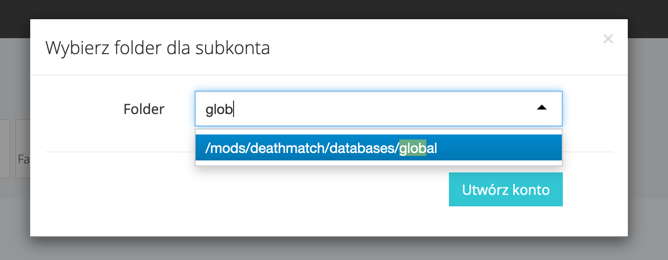
I want to add an FTP sub-account, but I can't find the folder I'm interested in.
When adding a sub-account, in addition to selecting the folder of interest from the drop-down list, you can remove the contents of the selection field and enter a fragment of the folder you're looking for. Example:
I'm getting the error #1273 - Unknown collation: 'utf8mb4_0900_ai_ci' when importing a database.
The error usually occurs due to database structure compatibility issues (database backup made
on MySQL, we usually use MariaDB). To solve the problem,
open the database file in a text editor and using the "Find and replace" function, replace the words utf8mb4_0900_ai_ci
with utf8mb4_unicode_ci. Before trying to import again, make sure the database is empty.
Files are downloading or uploading to the server slowly via FTP, how can I speed this up?
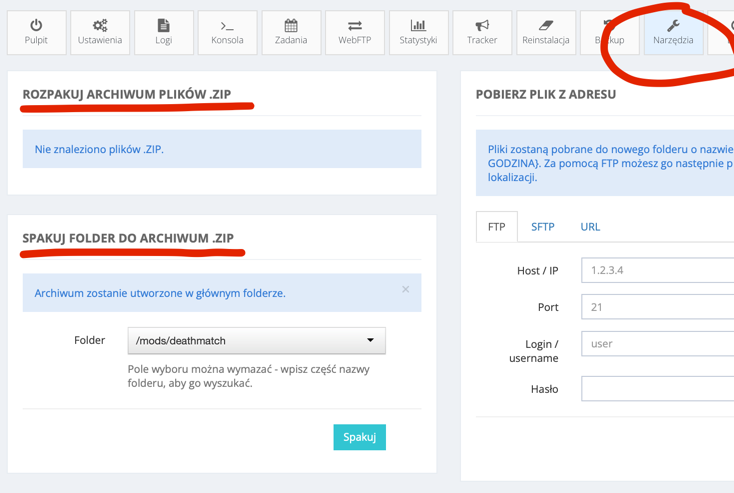
Usually, a large number of small files download/upload slowly. Pack the files into a .zip archive and pack/unpack them in place. Use the Tools tab in the panel for this.
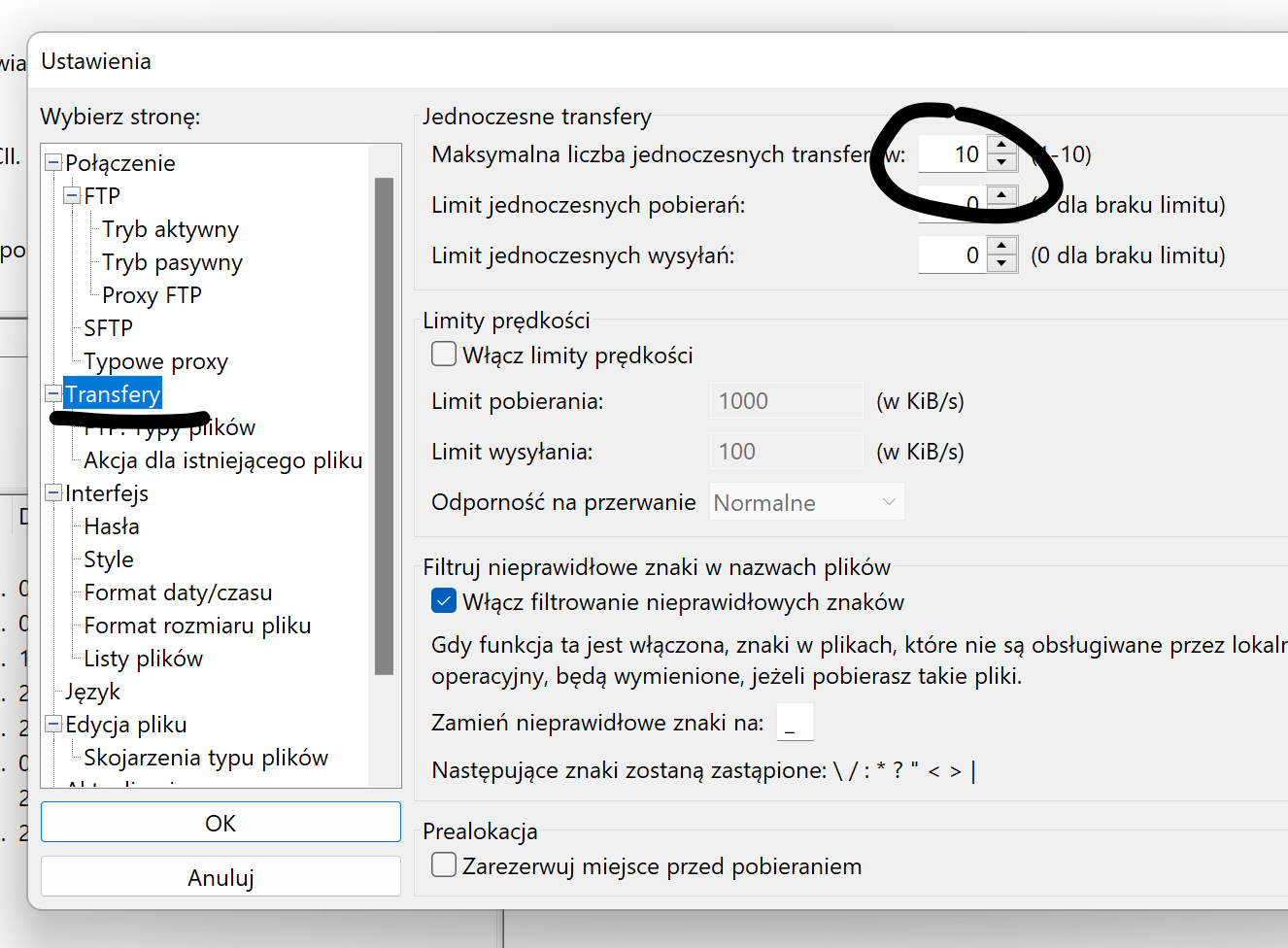
Using Filezilla
Filezilla allows you to upload multiple files simultaneously. To set this up, after launching the program, select in the upper left corner Edit -> Settings then Transfers and select: Maximum number of simultaneous transfers to 10.
I can't delete a directory via FTP. I get the error "Directory not empty".
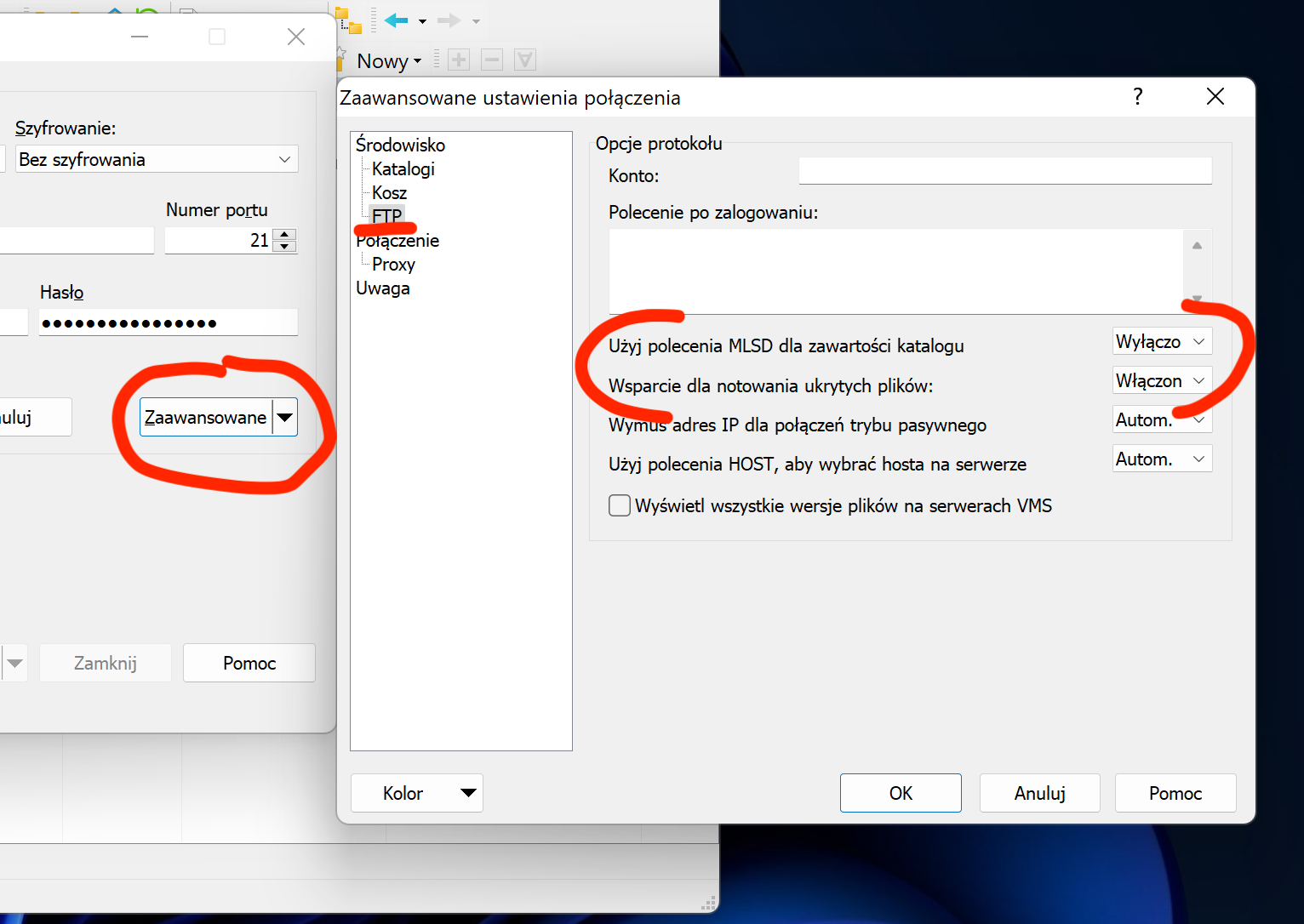
The cause is symbolic links (symlinks/shortcuts) in the folder we want to delete. To solve the problem and make these files visible so the folder can be deleted, in WinSCP during FTP connection configuration click Advanced then Environment -> FTP:
Use MLSD command for directory contents- set to Disabled / OFFSupport for hidden file notation:- set to Enabled / ON