FAQ - MTA:SA servers
My MTA:SA server won't start, I click START but it remains offline.
In this case, the error message can be viewed by downloading the errors.log file from the main directory via FTP.
You can also do this via WebFTP.
Most often the cause is a syntax error in the configuration files
acl.xml or mtaserver.conf, or a server name that is too long.
Example syntax error in the acl.xml file, log that appeared in the errors.log file:
[24-06-25 11:21:18] Server stopped!
[24-06-25 11:21:17] ERROR: Error parsing acl.xml - Line 25: Error reading Attributes.
So we launch WebFTP and check what's happening in this file on the line indicated as number 25:
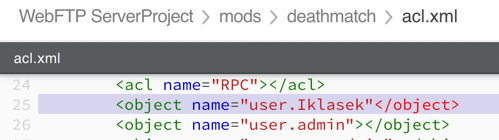
Thanks to syntax highlighting in WebFTP, you can immediately notice that the > character is missing after the string name="user.Iklasek".
Some errors like e.g.
ERROR: Loading mod (/clients/s65438/mods/deathmatch/deathmatch.so) failed!
*** stack smashing detected ***: terminated
can be eliminated by using the VERSION CHANGE option in the administration panel. Try changing from 64bit to 32bit or vice versa.
Remember that ultimately the REINSTALLATION option restores the server to default settings and after using it, the server will definitely start.
How to set so-called dynamic slots for an MTA:SA server?
Dynamic slots is a term describing the increase in the number of server slots
as players join. To achieve this effect, you need to
write a program/script using the setMaxPlayers function.
You'll find more information in the documentation.
How do I add an admin to an MTA:SA game server?
The procedure is as follows:
- Join the server and register using the command
/register login password. - Leave the server and turn it off.
- Edit the
acl.xmlfile (located in the/mtasa/deathmatch/directory). - Find the line
<group name="Admin">. - Under
<acl name="Admin" />add a new line<object name="user.ACCOUNTNAME" />.
Example:
<object name="user.Player" />
I'm getting the error DIAGNOSTIC: User #1002 HTTP server file mismatch! (example) example.lua [CRC could not open file: No such file or directory].
Possible causes of the error:
- the resource
(example) example.luawas modified and not restarted - the client has problems downloading the
example.luafile.
If the problem only occurs for one player, ask them to manually delete the example client cache by deleting:
C:\Program Files\MTA San Andreas 1.5\mods\deathmatch\resources\example
or
C:\Program Files (x86)\MTA San Andreas 1.5\mods\deathmatch\resources\example
Other variants of this error:
DIAGNOSTIC: User #1011 External HTTP file mismatch
I'm getting the error InResultQueue > 200000 msgs. This is due to server overload or script freeze
The error appears in the logs:
[25-06-01 00:00:00] [Network] InResultQueue > 200000 msgs. This is due to server overload or script freeze
[25-06-01 00:00:00] Temporarily suspending incoming sync packets
An additional symptom is often a CPU usage spike to 100%. This causes the Network Trouble error and game freezing/kicking players.
The problem is usually caused by a bug in scripts.
Information on finding bugs in MTA:SA: https://wiki.multitheftauto.com/wiki/Debugging
How to protect yourself against cheaters?
Cheaters exploit security vulnerabilities in incorrectly written scripts. Materials helpful in solving the cheater problem: https://wiki.multitheftauto.com/wiki/Script_security https://wiki.multitheftauto.com/wiki/Anti-cheat_guide