FTP server disconnects, what to do?
The FTP server closes the connection after a certain period of inactivity.
The following message may appear:
Response 250 CWD command successful Command: PASV
Response 227 Entering Passive Mode (49,12,218,71,179,241).
Command: STOR 622941-0.svg Error: Connection terminated after 20 seconds of inactivity
Error: File transfer failed
Status: Connecting to 49.12.218.71:21...
Command: PASV Response 227 Entering Passive Mode (49,12,218,71,172,5).
Command: STOR 622941-1.jpg
Error: Connection terminated after 20 seconds of inactivity
Error: File transfer failed
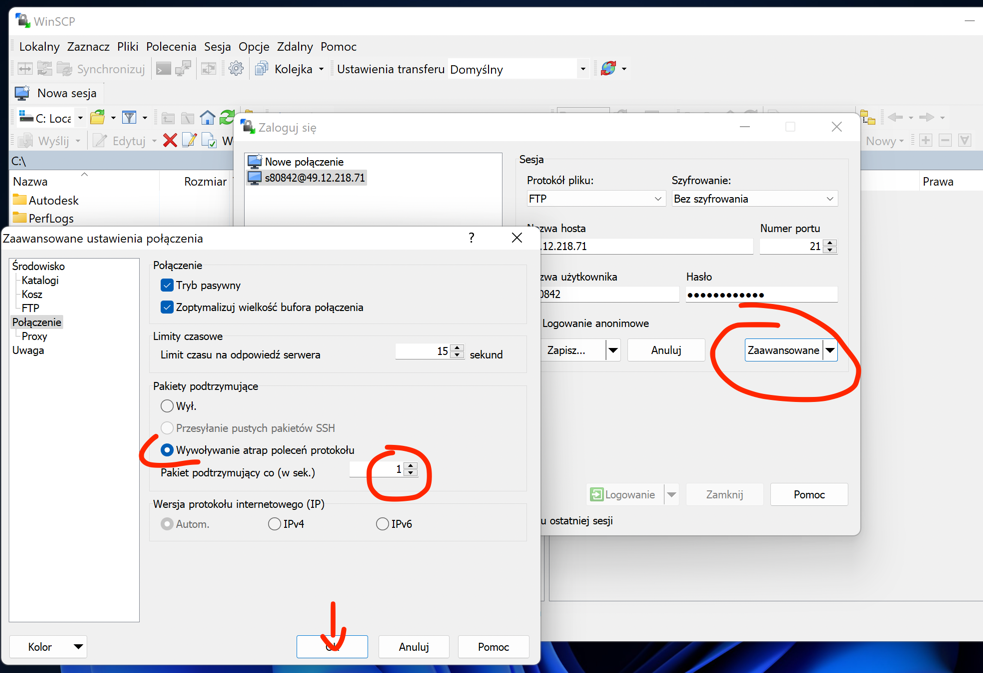
The solution is to configure sending a keep-alive packet. You can do this in the connection settings as shown in the screenshot below from WinSCP.