How to generate a GSLT Token?
- Go to the Steam server management page and log in.
- Scroll to the bottom of the page until you see the header
Create new server account.. - Fill in the App ID, which is
730for CS2, and Memo, to track your token by description (optional). Then click Create. Example below: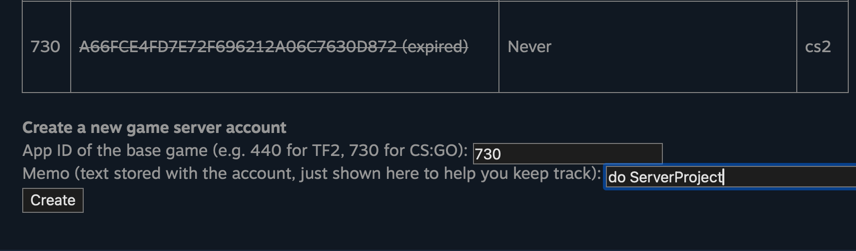
Note that the token can only be used on one server at a time. If you have multiple servers, you need to create multiple tokens.
-
After creation, you will see the generated game server key. This is the token that will be placed in the server configuration.

-
Go to the server settings in the ServerProject panel and enter the generated token in the field as shown in the screenshot below.
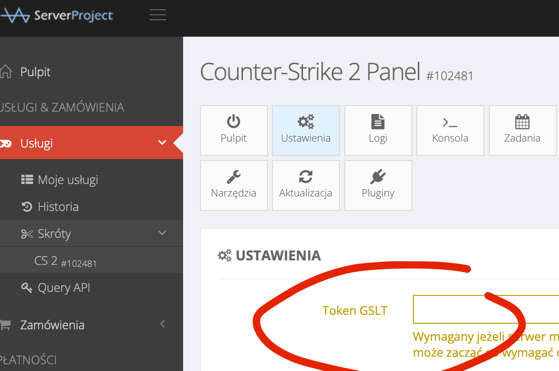
-
Save the settings and restart the server.
Possibility of GSL token ban by Valve
In the case of CS:GO, some plugins were non-compliant with Valve guidelines, such as !ws, !knife, and fake rank plugins. While we don't have information about this for CS2, it's likely that plugins that violate Valve guidelines will also result in a ban.
FAQ regarding GSLT blocks: official page
Getting banned results in blocking the creation of GSL tokens using a Steam account, and the associated phone number will also be banned, so you won't be able to create a new account using the same number. Your Steam account will be blocked for a certain time. Most users report an 11-day ban.
Token expiration and other limits
If a token is unused for 5 weeks (server turned off), it expires and can no longer be used. You'll simply need to generate a new token for the server to work properly again. You can only use one token per server. If you plan to host multiple servers, create multiple tokens - one for each server.