How to give yourself admin in the game?
- Go to the Plugins tab and install:
-
Metamod -
CounterStrikeSharp -
Basic Admin CounterStrikeSharp Plugin- optional, if you want to have access to an extended list of commands, such as !map, !kick, !adminhelp.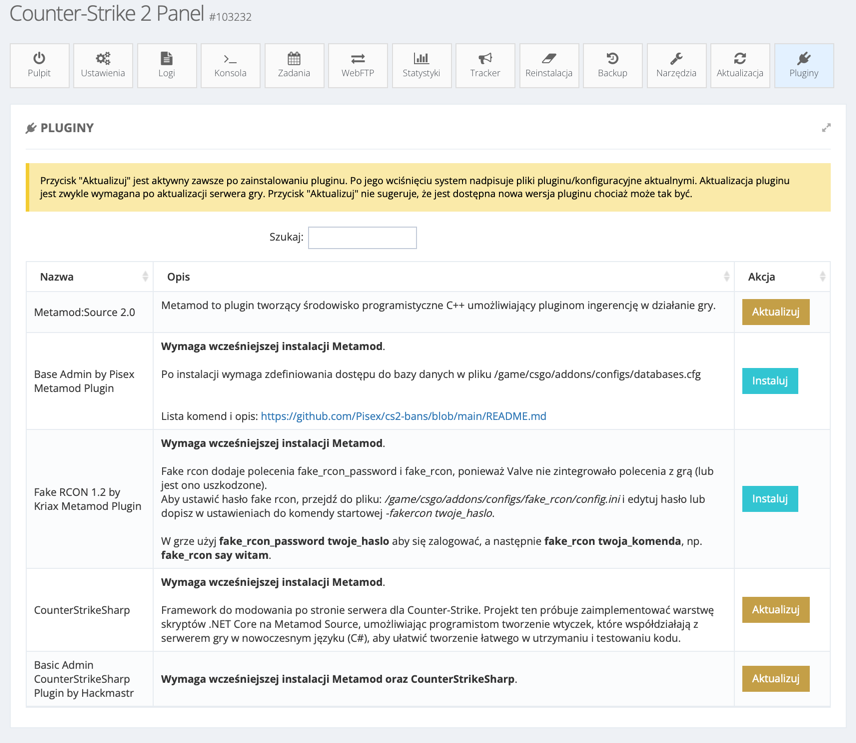
List of extended commands:
- css_admins - Displays a list of administrators.
- css_comms - System messages.
- css_admin_help - Administrator help.
- css_bury - Buries a player.
- css_unbury - Unburies a player.
- css_cvar - Changes server settings.
- css_csay - Sends a message to all players in the center of the screen.
- css_hsay - Sends a message to all players in the HUD.
- css_psay - Sends a private message to a selected player.
- css_disarm - Removes a player's weapon.
- css_freeze/css_unfreeze - Freezes/Unfreezes a player.
- css_extend - Extends time.
- css_forcespec - Forces a player to spectate.
- css_give - Gives a weapon to a player.
- css_kick - Kicks a player from the server.
- css_noclip - Toggles noclip for a player.
- css_map - Changes the server map.
- css_restartgame - Restarts the game.
- css_rr - Restarts the round.
- css_hp - Sets a player's health.
- css_slay - Kills a player.
- css_slap - Slaps a player.
- css_swap - Swaps a player to the opposite team.
- css_workshop - Changes the map.
- css_wsmap - Changes the map.
-
Go to Admins and enter your Steam ID 64, then click Create.
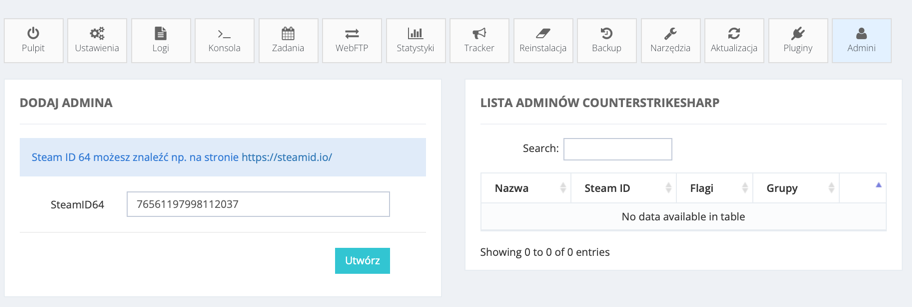
- Done. Now restart the server.