Installation and configuration of the Admin Base plugin (cs2-bans)
-
Go to the Plugins tab and install
MetamodandBase Admin by Pisex Metamod Plugin.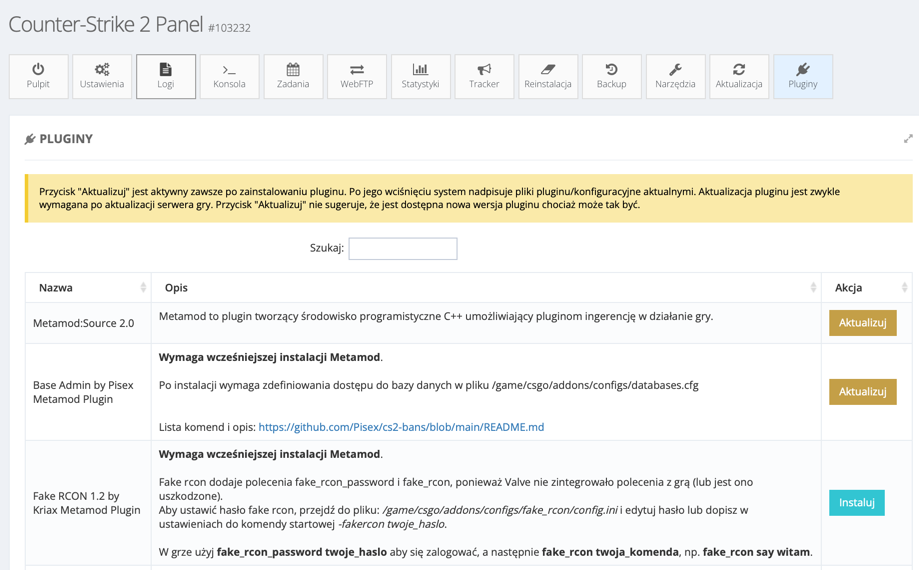
- Go to the Orders tab and activate the database that you received for your CS2 server.
-
Via FTP or WebFTP, edit the file
/game/csgo/addons/configs/databases.cfg. Enter the database credentials there and click SAVE.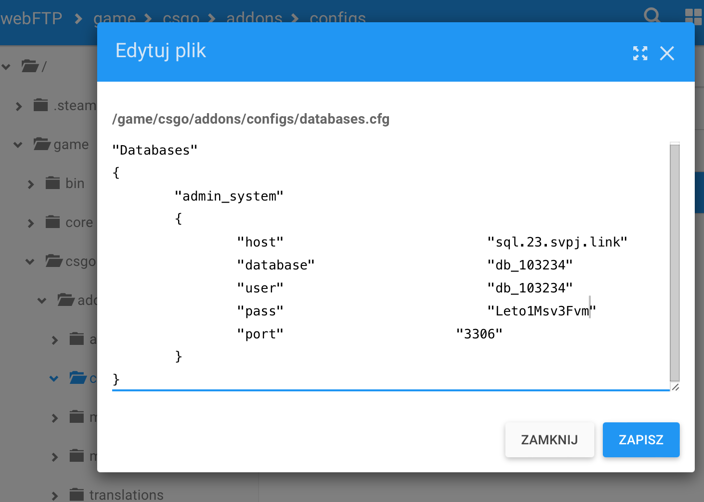
Example file content:
"Databases"
{
	"admin_system"
	{
		"host"				"sql.23.svpj.link"
		"database"			"db_103234"
		"user"				"db_103234"
		"pass"				"Leto1Msv3Fvm"
		"port"			    "3306"
	}
}
- Change the language to English by editing the file
/game/csgo/addons/configs/core.cfg:
"Core"
{
    "ServerLang"	"en"
}
-
Start the server and go to the server console, the
meta listcommand should return a list of installed Metamod plugins, as shown in the screenshot below: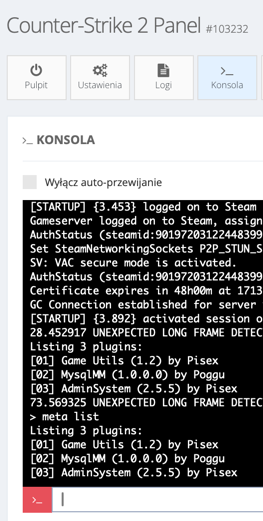
- Done. The list of commands is available on the author's GitHub modification.